
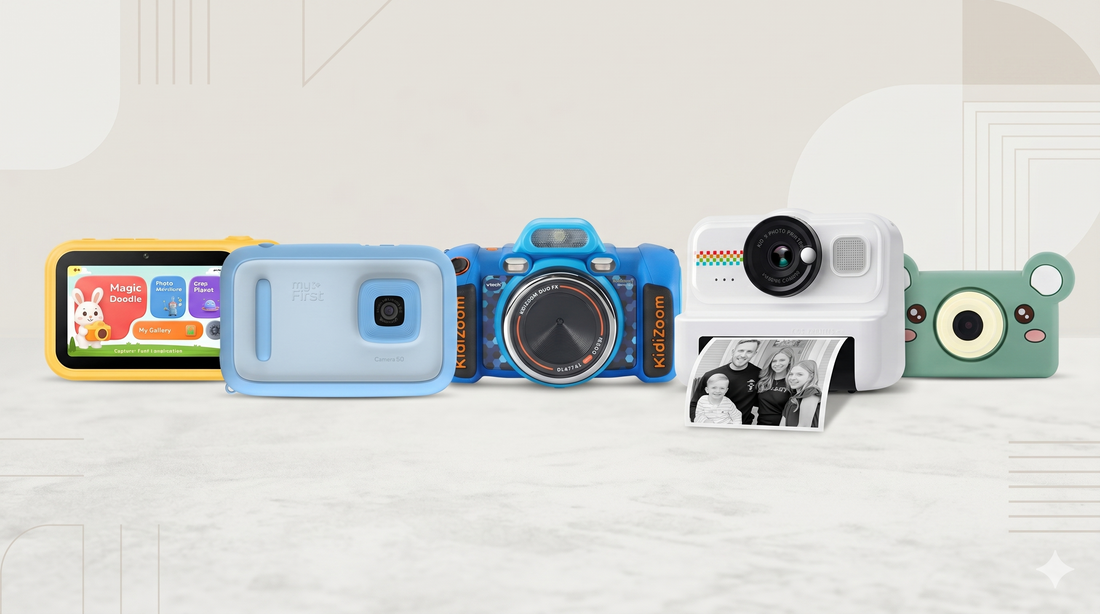
Kids’ cameras have evolved well beyond the grainy plastic toys of a few years ago. The newest wave folds in artificial intelligence — cameras that help children edit, create, and even learn from the photos they take. But the “AI” label now stretches across a wide range of devices, from genuine creative tools to ordinary cameras with auto-filters and a marketing badge.
To help parents cut through the noise, we looked at five of the most popular options for 2026, spanning different budgets, age ranges, and priorities. There’s no single “best” camera here — the right pick depends on your child’s age and what you want them to get out of it. Below, we break down where each one shines and where it falls short.
Quick comparison
| Camera | Best for | Rear / Front | Display | Power | Approx. price |
|---|---|---|---|---|---|
| myFirst Camera 50 | Safe sharing & video diaries | 20MP / 16MP | Touchscreen | Rechargeable | ~$130 |
| Jumpo | AI creativity & learning | 13MP / 5MP | 3.4″ touchscreen | Rechargeable | $99 (optional subscription) |
| VTech KidiZoom Duo FX | Budget first camera | 8MP / 2MP | 2.4″ screen | AA batteries | ~$45–50 |
| HiMont Instant Print | Physical keepsakes | Low | Small LCD | Rechargeable | ~$40–60 |
| Kidamento Model C | Toddler-friendly simplicity | Modest | 2″ screen | Rechargeable | ~$50–60 |
Specifications and pricing vary by retailer and region. Confirm current details before purchasing.
1. myFirst Camera 50 — Best for safe sharing

The myFirst Camera 50 is one of the most camera-like options here, built around a smartphone-style design. It pairs a 20MP rear camera and 16MP front lens, and its defining feature is the closed-loop “myFirst Circle” network, which lets kids share photos and videos only with parent-approved family and friends. A PIN-protected video diary called myDiary adds a private space for journaling.
Its AI works by letting kids pick photos and clips, then automatically assembling them into short highlight videos with music. Reviewers found this handy but modest — some questioned how much genuine AI was involved in the chronological edits — and noted the camera can be slow to start with occasional screen lag. At around $130, it’s among the pricier picks.
Best for: Kids aged 7–12 ready for safe, social-style sharing.
2. Jumpo — Best for AI creativity and learning

Jumpo takes a different approach from the camera-first competition: it’s designed around AI-driven creative activities. Its 13MP rear and 5MP front cameras feed into on-device experiences where children turn photos into watercolor, sketch, or cartoon art (Magic Doodle), follow guided photo missions that teach them about their surroundings (Photo Adventure), and create stories with friendly AI characters (Chat Planet) — all on a 3.4″ touchscreen guided by an on-screen mascot.
It’s the only camera in this group with built-in cellular connectivity (eSIM), so the AI features keep working away from home Wi-Fi. Parents manage everything through a web-based Parent Portal — reviewing photos, setting limits, and controlling privacy and backups. Jumpo retails for $99, with cloud and AI features offered through an optional subscription rather than a mandatory one, which keeps the entry price competitive while letting families opt into more.
Best for: Families who want a camera that grows a child’s creativity and curiosity, usable anywhere.
3. VTech KidiZoom Duo FX — Best budget pick

VTech’s KidiZoom line has been a best-seller for nearly a decade, and the Duo FX is the affordable mainstay at around $45–50. It’s rugged, simple, and loaded with AR face filters and games. It’s worth knowing the context, though: VTech is a toy maker first, and the Duo FX is a hybrid device — part camera, part audio toy, part games console.
Photo quality from the 8MP main and 2MP selfie cameras is modest, it runs on AA batteries that drain quickly, and several reviewers observed kids spending far more time on the built-in games than on photography. The AI here is essentially filters, not creative tooling — but for the price, it’s a durable, fun introduction.
Best for: A first camera for ages 3–6, where play matters more than picture quality.
4. HiMont Kids Camera Instant Print — Best for physical keepsakes

For kids who love a photo they can hold, instant-print cameras like the HiMont deliver a different kind of fun. It earns a strong rating across nearly 1,000 reviews, with parents praising the instant-print feature and kid-friendly design, and it ships with string, pegs, and markers so kids can decorate their prints.
It’s not an AI camera, though. Image and print quality are basic, and you’ll keep rebuying thermal paper. There’s no creative software layer or parental dashboard — the appeal is purely the tangible, in-the-moment print.
Best for: Parties, sleepovers, and younger kids who love tangible prints.
5. Kidamento Model C — Best for toddler simplicity

The Kidamento Model C rounds out the field as a pared-back, design-forward option aimed at the youngest users. Reviewers consistently highlight cameras like it for being easy to use, with a cute design, a simple touchscreen, and no built-in games to distract from actually taking pictures.
The trade-off is scope: modest image quality and few advanced features. There’s no AI creativity or connectivity. But for a toddler taking their very first photos, that simplicity is the point.
Best for: Toddlers and preschoolers taking their first photos.
How to choose
- For the youngest kids (3–6): A simple, rugged option like the Kidamento Model C or VTech KidiZoom Duo FX keeps things easy and affordable.
- For instant fun: The HiMont delivers physical prints kids can hold and decorate.
- For older kids who want to share: The myFirst Camera 50 offers a safe, closed sharing network and journaling.
- For creativity and learning that grows with a child: Jumpo’s AI activities and built-in connectivity make it the most future-facing pick, with a $99 entry price and optional subscription.
The kids’ camera market moves quickly, and the best choice ultimately comes down to your child’s age and what you hope they’ll do with it — whether that’s holding a printed photo, sharing safely with grandparents, or turning an afternoon walk into a piece of art.
Disclosure: This article is published by Jumpo. Product details for other cameras are drawn from manufacturer listings and independent reviews and were accurate at the time of writing; specifications and pricing change frequently, so please confirm current details with each retailer.


